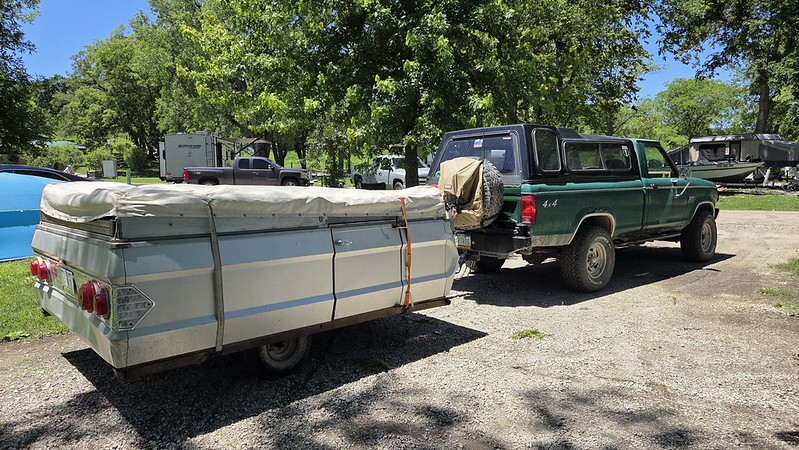
Aces Killshot Fusion EFI Swap


I forget where the settings are, but there are a couple that have to do with how often it adjusts the learn table and how much it relies on the learn table. Turn the first one down and the second all the way up. Leave it like this and update the stock fuel table as you go. Once you get less than +/-5% learn values, change those 2 settings back to factory.

Definitely print this document out. It has better descriptions of what each option in the PC software does. I used it a lot when I was trying to self tune mine.

https://cdn.shopify.com/s/files/1/0...ot_Series__Definitions_Guide.pdf?v=1758830242
 
I started actually tuning the thing, not knowing what I am really doing it is kind of fun so far.

From what I have gleaned off the interwebs there are two tables that really are key. The VE (Volumetric Efficiency) and the Self Learn Table.

You pick stock, mild or race for the VE table (obviously I opted for stock because my engine is stock) The computer charts where it has to pull or add fuel to keep the engine happy with that table on the self learn table. Then you go in and change the VE table to try to get the self learn table to read +/- 2-5% (per strangers on the internet because there is no available official documentation on how to do this)

And then a bunch of other tables pull data off the VE table on how to operate everything else. People just slap it on thinking it is self learning and get upset when it isn't exactly right because it only controls the A/F ratio but everything else is still pulling off the untouched VE table. And it really isn't their fault because that is how they are marketed. From what I gather most of these TBI kits that are marketed as "self learning" are similar. Really a professional tune is ideal... but since I was cross shopping Megasquirt among other things I wanna try it myself first.

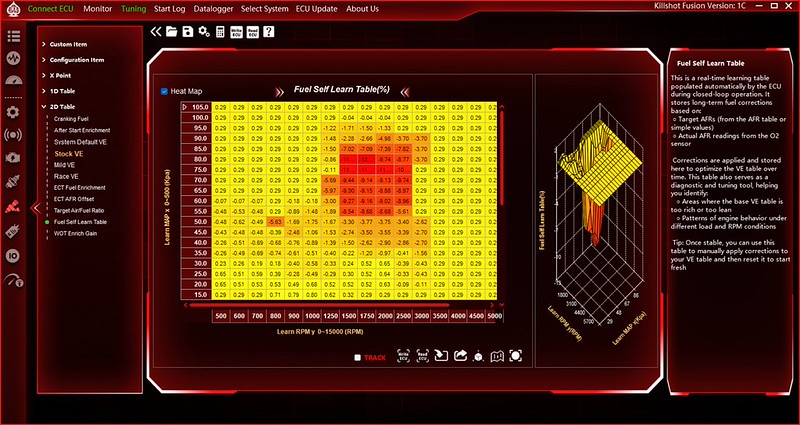
My initial self learn table looked like this:
Aces Killshot Fusion EFI Swap

I just drove it to town twice, you can see it is pretty much just nailing cruise RPM pretty hard (1500-2500rpm) .29 is the base value, if I zero the table it says .29 everywhere so I am assuming where it says .29 it hasn't been there to try to change anything yet.

I did some messing around and with a couple way too short drives I have it reading better.
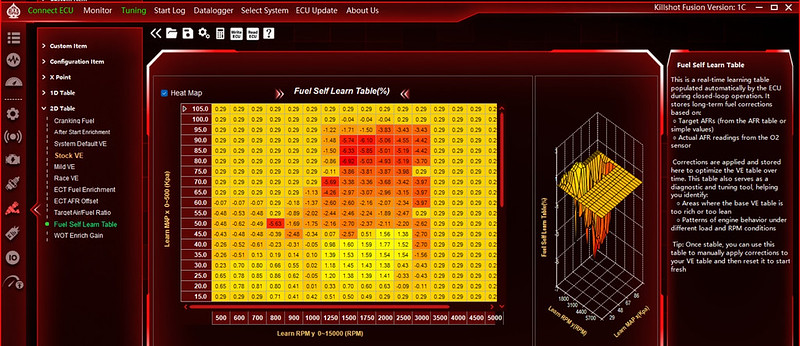
Aces Killshot Fusion EFI Swap

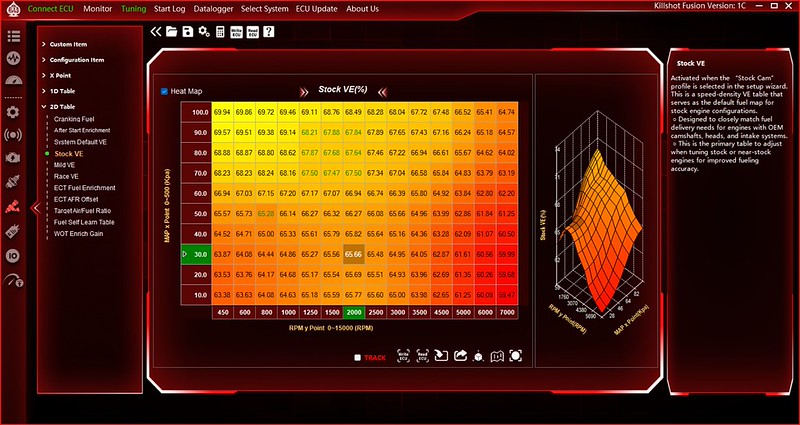
I took a bit more out of the VE Table (in green) after that with the intent to drive it to work again today to get more data than my short drives last night.
Aces Killshot Fusion EFI Swap

Then I got in the house and saw they are talking maybe severe weather today so I poked it in the garage and didn't drive it today. Otherwise I have been driving it all week.

For initial impressions, it runs awesome once it starts. It does a little prime thing where the injectors squirt a bit before it starts. Similar to a carb accelerator pump shot before you crank on it. Now that I have the locked dizzy it seems that may be a bit heavy handed and it acts like it floods it and fights the starter. Base timing is set to 15*, I tried setting it to 10* for cranking like it was carb at startup and it did not like that at all, I set it to 20* and it helped significantly. I am trying to get the VE table more close to perfect before I actually alter the fuel prime table so I am not fighting myself on it. In the mean time if I crank before it does the prime thing it seems to start fine anyway but it is also fairly warm (70's-80's)

Fans work great, cruise works great. Overall it drives nice enough that if it was a carb and not talking to me I would drive it anywhere. As I get the VE table nailed down it will dial in other things and then I can fine tune even more things as well and it should get even better.

Forgive me for not reading 20 pages... are you running a wideband?
 
I'll go back and read... interesting setup, weird that it makes you tune for VE instead of tuning VE around fuel and spark.
 
I forget where the settings are, but there are a couple that have to do with how often it adjusts the learn table and how much it relies on the learn table. Turn the first one down and the second all the way up. Leave it like this and update the stock fuel table as you go. Once you get less than +/-5% learn values, change those 2 settings back to factory.

Definitely print this document out. It has better descriptions of what each option in the PC software does. I used it a lot when I was trying to self tune mine.

https://cdn.shopify.com/s/files/1/0...ot_Series__Definitions_Guide.pdf?v=1758830242

Correction - 3 settings:

Fuel Learn Rate: turn up
Fuel Learn Cycle: turn down
Fuel Learn Read Coef: turn up

This is on page 18 of the definitions guide.
 
I'll go back and read... interesting setup, weird that it makes you tune for VE instead of tuning VE around fuel and spark.
I'll have to admit I'm not used to tuning a VE table, the main engine control setup I've used is set up for speed density from the get go and the fuel table is in mg... but the other system I've used that I haven't had to deal with in ages has a VE table based on estimated torque (super dumb) and rpm. Having a VE table based on MAP and rpm would make sense to me but we'll see, I'll be using a different engine controller here in a month or so... Everyone has a better idea it seems, one I've used was made by GM and the other was made by computer programmers that have heard of engines and had an idea of what tables were needed...

Don't mean to muddy things up, I'd help if I knew what buttons needed pushed... I'm paying attention since my Explorer and likely mustang projects will probably need tuning of some form and I'm always up to learn...
 
I'll have to admit I'm not used to tuning a VE table, the main engine control setup I've used is set up for speed density from the get go and the fuel table is in mg... but the other system I've used that I haven't had to deal with in ages has a VE table based on estimated torque (super dumb) and rpm. Having a VE table based on MAP and rpm would make sense to me but we'll see, I'll be using a different engine controller here in a month or so... Everyone has a better idea it seems, one I've used was made by GM and the other was made by computer programmers that have heard of engines and had an idea of what tables were needed...

Don't mean to muddy things up, I'd help if I knew what buttons needed pushed... I'm paying attention since my Explorer and likely mustang projects will probably need tuning of some form and I'm always up to learn...
I learned with MS and DIYAutotune... maybe not the best system to learn with, but it makes sense once you get used to playing "poke and hope" setting fuel and spark, then letting the machine do the rest. Eventually, you will get it to run, and eventually it will run well. Speed density is "good" at getting an engine to run properly, but there is merit to the argument that it only gets you 80% of the way to perfection (good enough for me tbh).

I'm currently messing with HP and trying to learn MAF and knock simultaneously with no MAP sensor. Plus everything is in Lambda in the new crap, so thats fun... It's like getting air dropped into a foreign country with no knowledge of the local language and told 'good luck.' It's annoying, but I can see why they went to it if the goal was to get an engine to constantly run at stoic in order to maximize catalytic efficiency. Kiss fuel economy and power goodbye, tho...

General motors? Good luck, buddy. Between simulated VE tables that phase in and out depending on running conditions, and torque management tables... nah, I'm good.

Theres a few youtube guys out there that are semi helpful with tuning... Goat Rope is a good one for GM stuff... sorta. A few other random ones here and there. Seems there was a crackdown on a lot of it a few years ago due to epa stuff and a bunch of videos/channels got yeeted... sad. I hate the constant march of censorship wiping out knowledge.
 
I forget where the settings are, but there are a couple that have to do with how often it adjusts the learn table and how much it relies on the learn table. Turn the first one down and the second all the way up. Leave it like this and update the stock fuel table as you go. Once you get less than +/-5% learn values, change those 2 settings back to factory.

Definitely print this document out. It has better descriptions of what each option in the PC software does. I used it a lot when I was trying to self tune mine.

https://cdn.shopify.com/s/files/1/0...ot_Series__Definitions_Guide.pdf?v=1758830242

Among other things (like what each wire actually does) this should be in the owners manual.

It is really hard to say this is better/easier than a carb when the carb manual available everywhere (and included with the carb) has all the information you need to know.

That is a super cool document, it is kind of old though. I wish there was one for the current software.

I'll go back and read... interesting setup, weird that it makes you tune for VE instead of tuning VE around fuel and spark.

I am on "simple" setting for the ignition so far, I wish I would have made a timing table before I did away with the Duraspark. I need to get brave, circle back and try to switch that to the 2D table and see how that works.

I have had so much problem with distributors and the coil driver program is so crude unless you dial it in for your engine I almost wish I would have left the ignition side of it alone. There is no self learn for the timing tables at all.

Despite all that it is running pretty good. Highest number on the VE table last night was 4.something. Runs and drives really well. Dialed the startup timing back to 8*BTDC and it doesn't fight with the starter anymore. The tip in bog is back a little but mainly when I am just revving it in neutral, I am chasing that right now.

But it is very livable right now, on the street it runs awesome.
 
Last edited:
Among other things (like what each wire actually does) this should be in the owners manual.

It is really hard to say this is better/easier than a carb when the carb manual available everywhere (and included with the carb) has all the information you need to know.

That is a super cool document, it is kind of old though. I wish there was one for the current software.


I am on "simple" setting for the ignition so far, I wish I would have made a timing table before I did away with the Duraspark. I need to get brave, circle back and try to switch that to the 2D table and see how that works.

I have had so much problem with distributors and the coil driver program is so crude unless you dial it in for your engine I almost wish I would have left the ignition side of it alone. There is no self learn for the timing tables at all.

Despite all that it is running pretty good. Highest number on the VE table last night was 4.something. Runs and drives really well. Dialed the startup timing back to 8*BTDC and it doesn't fight with the starter anymore. The tip in bog is back a little but mainly when I am just revving it in neutral, I am chasing that right now.
The 2.9 spark table in one of my old threads should be close... it's based on the AL4D (whatever it is) tune from ford.

And yeah, I'm used to the timing thing being a blank slate... it's a crapshoot with MS.

I prefer 2d tables tbh. 3d ones... meh. Unless you're racing, I don't see the need.

Tip in and idle are both a b*tch to dial. Lots and lots and lots of passes and recording...

I need to read all of this to see where you're at
 
General motors? Good luck, buddy. Between simulated VE tables that phase in and out depending on running conditions, and torque management tables... nah, I'm good.

Theres a few youtube guys out there that are semi helpful with tuning... Goat Rope is a good one for GM stuff... sorta. A few other random ones here and there. Seems there was a crackdown on a lot of it a few years ago due to epa stuff and a bunch of videos/channels got yeeted... sad. I hate the constant march of censorship wiping out knowledge.
Conveniently I work with their marine version that is designed for speed density with actual logic applied along with many transient fueling options and power enrichment tables and all the good stuff, full slew of diagnostics and many labels in actual english and sometimes there's even descriptions...
 

Sponsored Ad

TRS Events & Gatherings

Featured Rangers

Want to see your truck here? Share your photos and details in the forum.

TRS Latest Video

Official TRS Merchandise

Follow TRS On Instagram


Product Suggestions

Back
Top