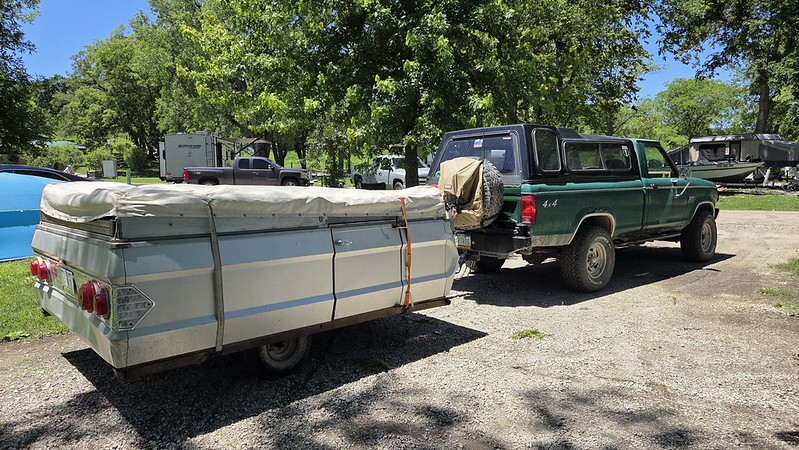
I started actually tuning the thing, not knowing what I am really doing it is kind of fun so far.
From what I have gleaned off the interwebs there are two tables that really are key. The VE (Volumetric Efficiency) and the Self Learn Table.
You pick stock, mild or race for the VE table (obviously I opted for stock because my engine is stock) The computer charts where it has to pull or add fuel to keep the engine happy with that table on the self learn table. Then you go in and change the VE table to try to get the self learn table to read +/- 2-5% (per strangers on the internet because there is no available official documentation on how to do this)
And then a bunch of other tables pull data off the VE table on how to operate everything else. People just slap it on thinking it is self learning and get upset when it isn't exactly right because it only controls the A/F ratio but everything else is still pulling off the untouched VE table. And it really isn't their fault because that is how they are marketed. From what I gather most of these TBI kits that are marketed as "self learning" are similar. Really a professional tune is ideal... but since I was cross shopping Megasquirt among other things I wanna try it myself first.
My initial self learn table looked like this:
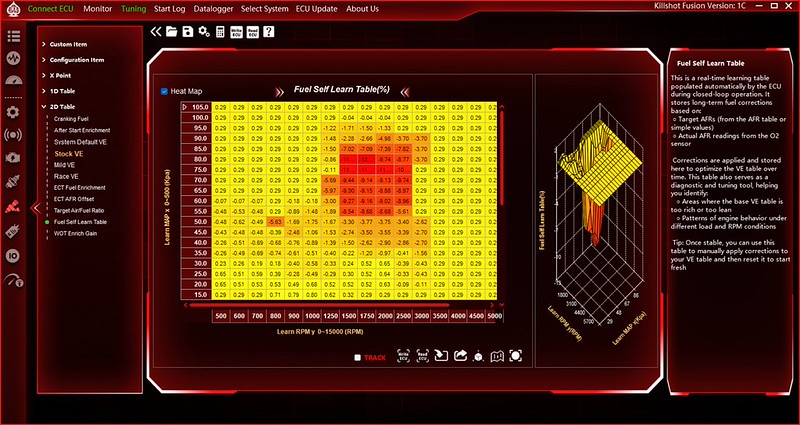
I just drove it to town twice, you can see it is pretty much just nailing cruise RPM pretty hard (1500-2500rpm) .29 is the base value, if I zero the table it says .29 everywhere so I am assuming where it says .29 it hasn't been there to try to change anything yet.
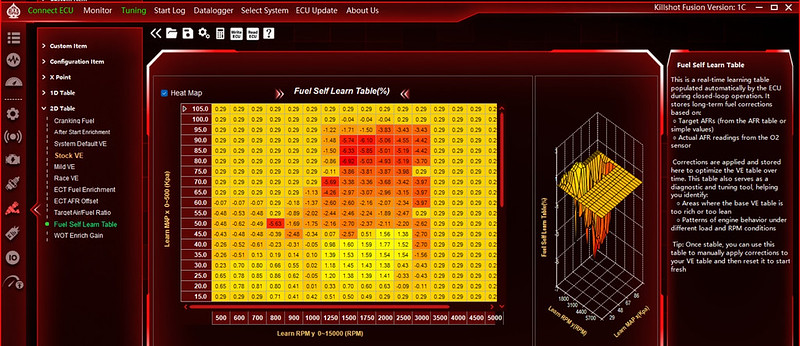
I did some messing around and with a couple way too short drives I have it reading better.
I took a bit more out of the VE Table (in green) after that with the intent to drive it to work again today to get more data than my short drives last night.
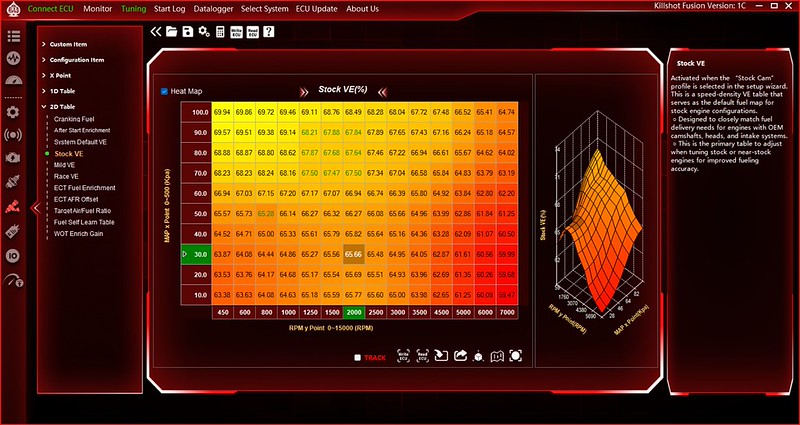
Then I got in the house and saw they are talking maybe severe weather today so I poked it in the garage and didn't drive it today. Otherwise I have been driving it all week.
For initial impressions, it runs awesome once it starts. It does a little prime thing where the injectors squirt a bit before it starts. Similar to a carb accelerator pump shot before you crank on it. Now that I have the locked dizzy it seems that may be a bit heavy handed and it acts like it floods it and fights the starter. Base timing is set to 15*, I tried setting it to 10* for cranking like it was carb at startup and it did not like that at all, I set it to 20* and it helped significantly. I am trying to get the VE table more close to perfect before I actually alter the fuel prime table so I am not fighting myself on it. In the mean time if I crank before it does the prime thing it seems to start fine anyway but it is also fairly warm (70's-80's)
Fans work great, cruise works great. Overall it drives nice enough that if it was a carb and not talking to me I would drive it anywhere. As I get the VE table nailed down it will dial in other things and then I can fine tune even more things as well and it should get even better.