INFO User Profiles, Signatures, Banners, User Upgrades, Posting Messages & Photos


When I agreed, I was being half serious, half tongue in cheek. I can't do any banners, that would be up to Jim. I really doubt something like that would fly, then you'd have southerners wanting a +40C banner, and hurricane banners, ad nauseam.
 
When I agreed, I was being half serious, half tongue in cheek. I can't do any banners, that would be up to Jim. I really doubt something like that would fly, then you'd have southerners wanting a +40C banner, and hurricane banners, ad nauseam.

No... They would want it in Fahrenheit.
 
When I agreed, I was being half serious, half tongue in cheek. I can't do any banners, that would be up to Jim. I really doubt something like that would fly, then you'd have southerners wanting a +40C banner, and hurricane banners, ad nauseam.

And then there's those who reside in the NorthEastern US. They'd want a Yankee banner (civil war). Aww, heck, we may as well get it over with.... A banner for the deep South, the Pacific North West, MidWest, SouthWest, Canadian Maritimes, naw, let's go all out, and go with our license plate slogans. That's more descriptive of who we are and where we're from.

I see what you mean, though. It gets a little crazy.
 
The old software had a feature that allowed me to set the number of posts per page (default was 10, I set it to 20).

It's 15 now, and I'd really like to be able to increase it to 20 again (or higher, maybe 25), but I can't find the setting (assuming it exists).
 
The old software had a feature that allowed me to set the number of posts per page (default was 10, I set it to 20).

It's 15 now, and I'd really like to be able to increase it to 20 again (or higher, maybe 25), but I can't find the setting (assuming it exists).
I hate when I agree with you. It pains me.
 
Why do you think I'm messing with you? I'm doing my job, herding a turd. :tease:
User Profiles, Signatures, Banners, User Upgrades, Posting Messages & Photos
 
The Ranger Station forum is now working on new software in order to be 'mobile friendly'. It's not that hard to figure out how to use, but here's some tips to help you out:

Your Member Profile:

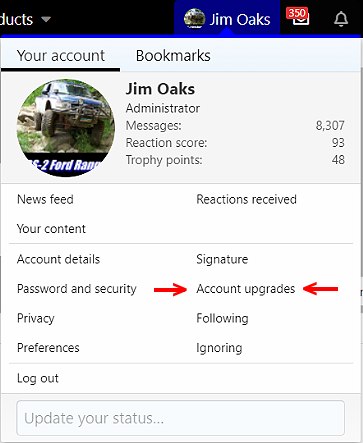
Up in the top right of the forum you will see your user name. If you click on your user name, a small window will open:

User Profiles, Signatures, Banners, User Upgrades, Posting Messages & Photos


You'll see where it says 'Account Details' and 'Signature'. You can click these to edit.

Account Details - Will allow you to change your email address and avatar. There is also a variety of things for you to check off or fill in to complete your profile. These will effect the information that is shown under your name when you post, as well as the banners you see displayed.

Some of these banners include:

Solid Axle Swap
Ford Technician
EMT / Paramedic
Firefighter
Law Enforcement
Military (Active or Veteran)
Solid Axle Swap
V8 Engine Swap

At the very least, I would recommend that you list your City & State next to 'Location', so we all know where each other is.

Signature - The test that is displayed under your messages.

The Tailgate and The Sanctuary Forums:

In order to view these forums, you have to go in to your 'Account Details' and check the box for each of these forums if you want to view them.

Account Upgrades:

User Profiles, Signatures, Banners, User Upgrades, Posting Messages & Photos


The 'Account Upgrades' link is where you can upgrade your user account to a 'Supporting Member', 'Supporting Seller', 'Supporting Vendor', or make a donation to receive the 'TRS 20th Anniversary Banner'.

You can also go directly to it here:


Posting Threads:

Posting a new topic (thread) is easy. You can either click on the 'Post Thread' button:

User Profiles, Signatures, Banners, User Upgrades, Posting Messages & Photos


Or by typing a discussion title in the 'Thread Title' box right above the most recent forum post:

User Profiles, Signatures, Banners, User Upgrades, Posting Messages & Photos


Adding Photos / Videos:

If you want to add a photo or video to your post, click the image icon above your message (see below). It will allow you to either upload a photo, or enter the link to your photo. It will not allow you to upload a photo larger than 2,048 KB (2.04 MB).

User Profiles, Signatures, Banners, User Upgrades, Posting Messages & Photos


The drop down (2) spaces to the right of that will allow you to enter a link to display media from places such as YouTube.
User Profiles, Signatures, Banners, User Upgrades, Posting Messages & Photos


Good luck and enjoy!!
 
As a new member and knowing diddly about how to use the various links I was pleased to happen to see this one. Very helpful. Thank you.
 
Is there a way to change my username?

I can find a way to change my email, my signature, my birth date, and just about everything else, but I can't find a place to change my displayed username.
 
Is there a way to change my username?

I can find a way to change my email, my signature, my birth date, and just about everything else, but I can't find a place to change my displayed username.

The only people who might be able to is an admin or the site owner but from my understanding, even they can't change that.
 

Sponsored Ad

TRS Events & Gatherings

Latest posts

Featured Rangers

Want to see your truck here? Share your photos and details in the forum.

TRS Latest Video

Official TRS Merchandise

Follow TRS On Instagram


Product Suggestions

Back
Top